How AI-0 Credits Work: A Clear Guide to Free AI Generations
Learn how AI credits work in AI-0, how optional ads earn credits, and how to estimate free image and video generations from current model costs.

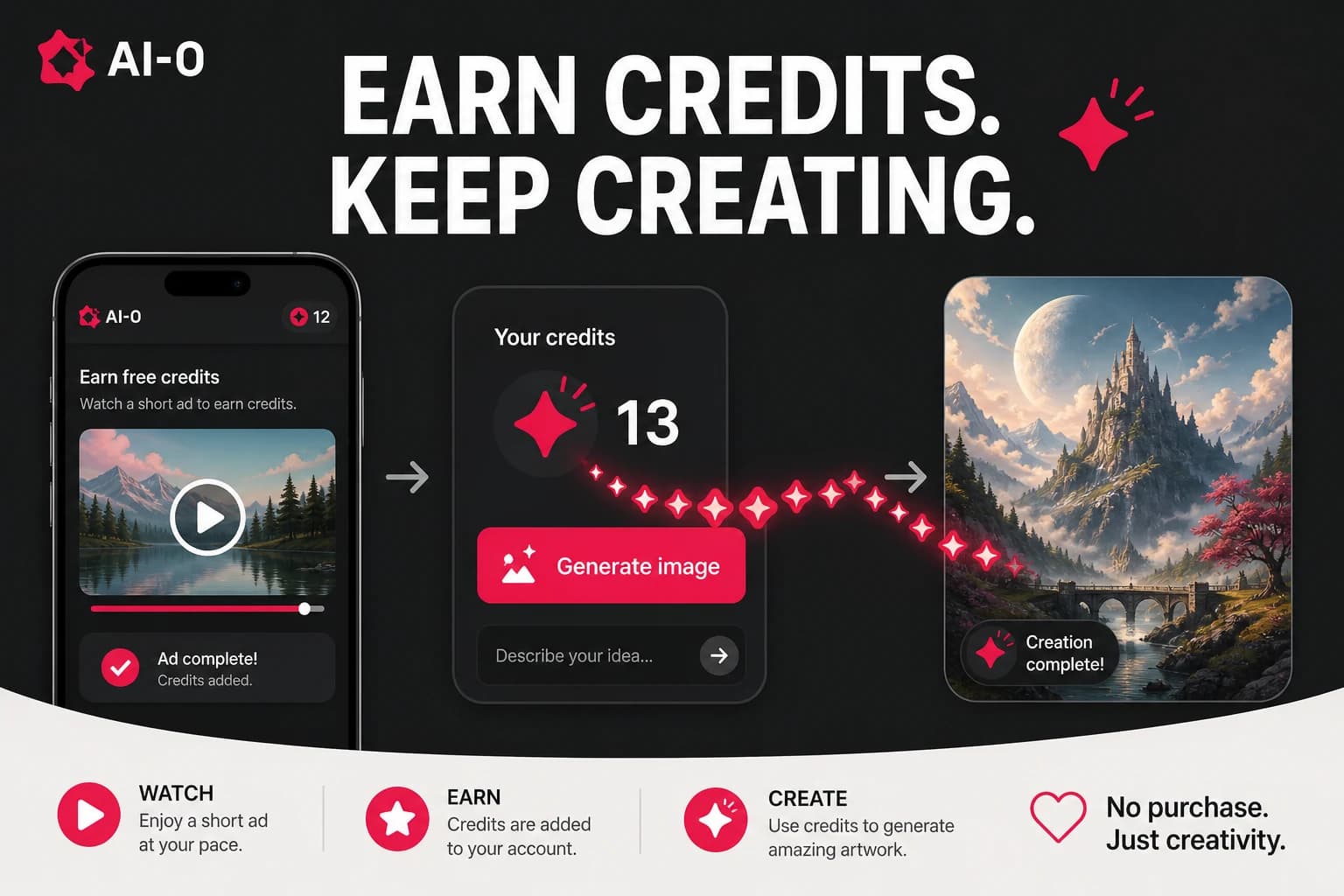
AI credits work like a generation balance. In AI-0, you can earn credits through optional ads, choose an image or video model, and see the cost before you create. How many free AI generations you can make depends on two live numbers: the credits you earn and the final price shown on the Generate button.
Credits can sound like the sort of thing that needs a calculator and a terms-of-service seminar. It does not. If your balance is 50 and a generation costs 35, you can make it and keep 15. The wrinkle is that different models cost different amounts, and some settings can change the total. Reading the button before tapping it solves most of the confusion.
This guide uses real AI-0 screens captured on August 9, 2026. They are useful examples, not permanent price promises. Reward windows, models, and generation costs can move as the app changes. Download AI-0 from the App Store or Google Play.
How many AI generations can I make for free?
There is no fixed answer for every account or model. Divide your available credits by the final generation cost and round down. In our August 9 iOS capture, one optional ad earned 5 credits. A 35-credit image needed seven ads; a 45-credit video needed nine. Ten ads at that displayed rate earned 50 credits, enough for either example with a small balance left.
What AI-0 credits pay for
Credits pay for creation jobs inside AI-0. You select a model, enter a prompt, choose any available settings, and review the total. Image generations usually ask the model to create one or more still pictures. Video jobs ask it to create several seconds of moving frames, which is why they often cost more.
A credit is not a dollar and it has no cash value. It is simply the unit AI-0 uses to show the relative cost of a job. That matters because the app offers models with different requirements. A quick image draft and a longer, higher-quality video should not pretend to be the same amount of work.
A current example with image and video models
The clearest way to answer "how do AI credits work?" is to use the numbers that were actually on screen. During our August 9, 2026 iOS check, AI-0 showed these three values:
| Screen | Example shown | Credit math |
|---|---|---|
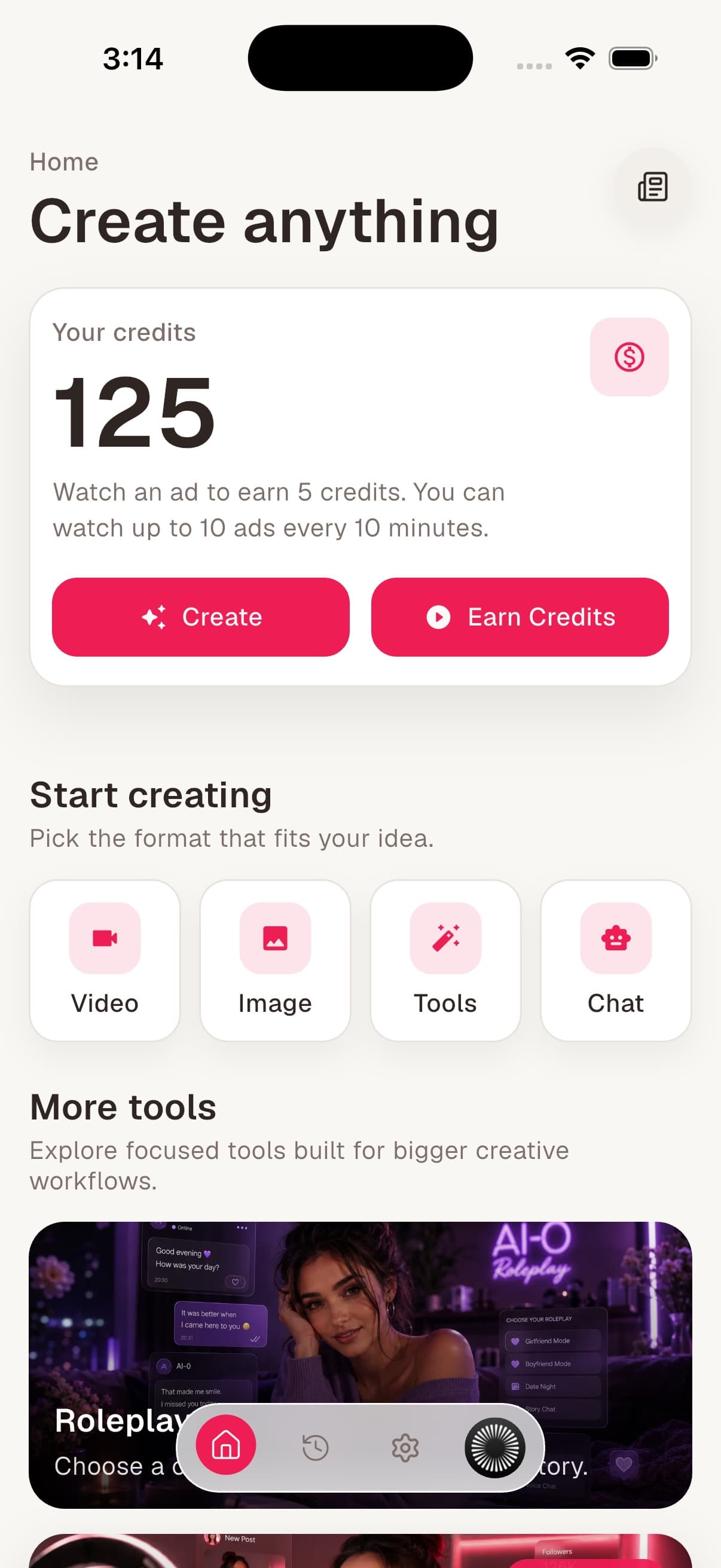
| Home | 5 credits per optional ad, up to 10 ads every 10 minutes | A full displayed window could earn 50 credits. |
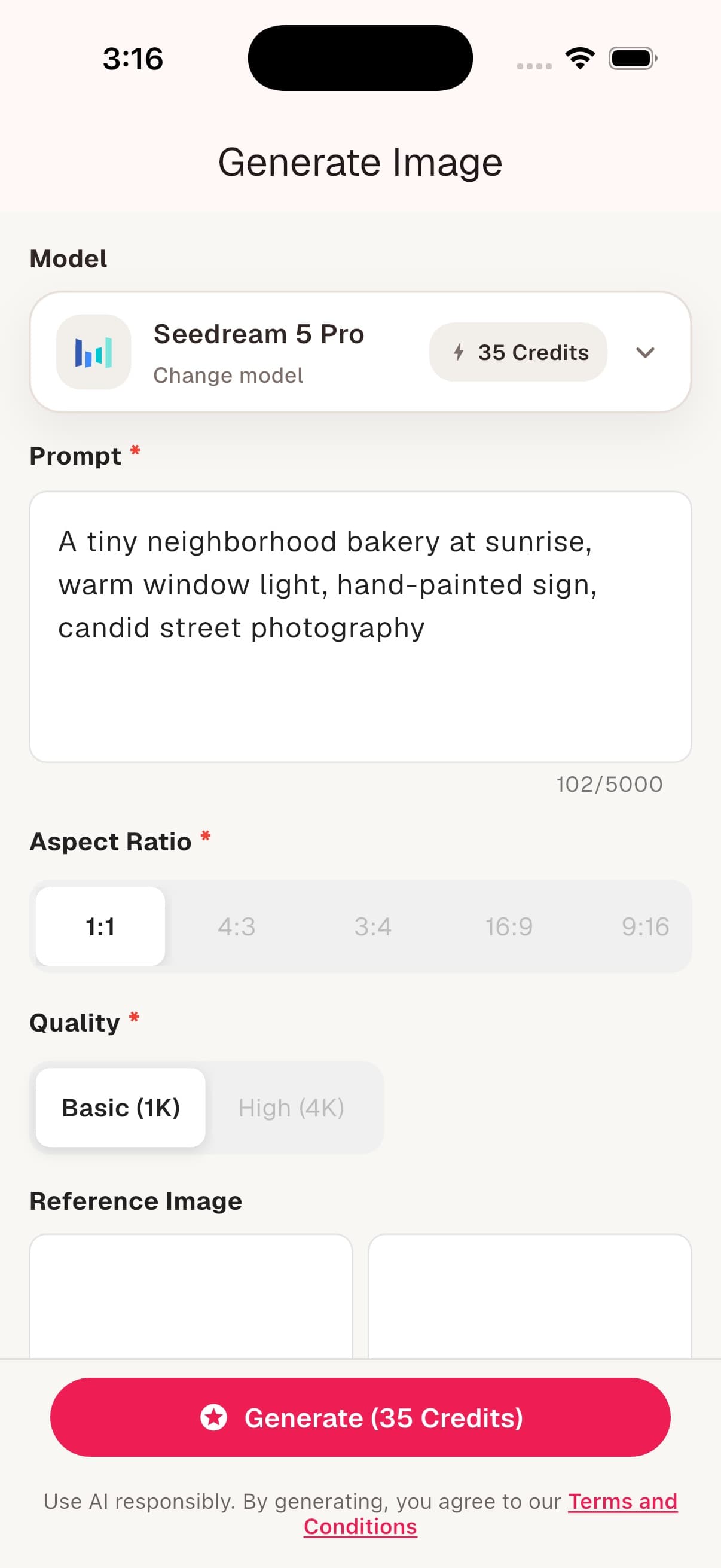
| Generate Image | Seedream 5 Pro setup at 35 credits | Seven 5-credit ad rewards covered one generation. |
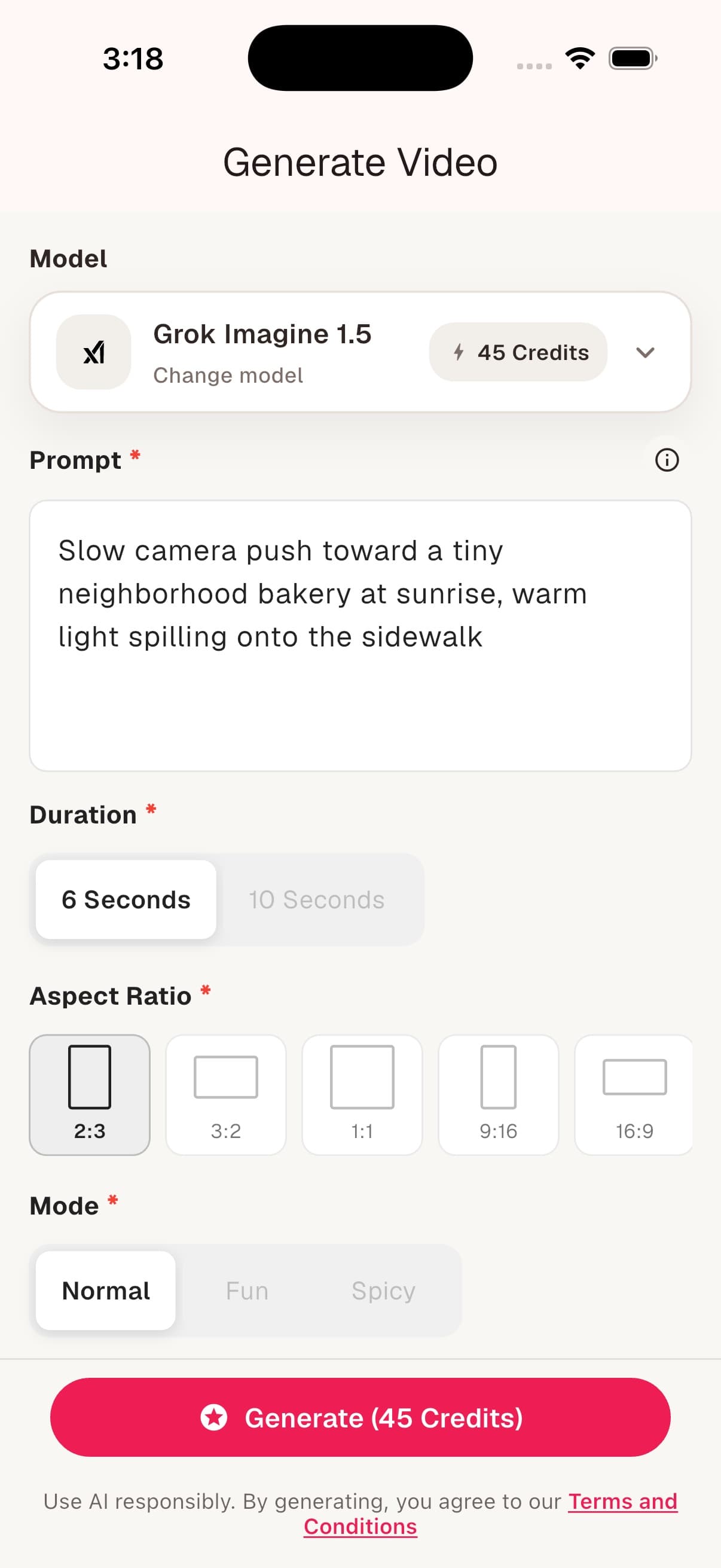
| Generate Video | Grok Imagine 1.5, six seconds, at 45 credits | Nine 5-credit ad rewards covered one generation. |
Those numbers do not mean every AI-0 image costs 35 credits or every video costs 45. They record two specific forms with specific models and settings. Open the app today and you may see another model, price, reward, or limit. The arithmetic stays the same.
Example: one free AI image
The captured Seedream 5 Pro form showed a 35-credit total. At 5 credits per optional ad, seven completed rewards would cover that setup. If the account already had 20 credits, it would need only three more ads to reach 35.
Example: one free AI video
The six-second Grok Imagine 1.5 form showed 45 credits. Nine 5-credit rewards would cover it. That is a good reminder that "free generation" does not mean the job has no cost. It means you can cover the cost with time and available ad rewards instead of a monthly payment.
How to earn free AI credits in AI-0
1. Open Home and check your balance
Your balance appears near the top of Home. Check it before watching anything. You may already have enough for a lower-cost image or a short test, and there is no prize for building a large balance you are not ready to use.
2. Review the current reward
Tap Earn Credits and read the amount offered for one ad, along with any window or cooldown. Watching is optional. If the reward is unavailable, the app may ask you to wait, return when ad inventory is available, or spend part of a high balance first.
3. Watch the ad and confirm the balance
Complete the rewarded ad, return to Home, and make sure the balance updates. Reward confirmation can occasionally take a moment. Refresh the balance before tapping Generate so you know what is actually available.
4. Choose a model you can afford
Open Image or Video and compare the current model choices. Cost is one part of the decision. The cheapest model is not a bargain if it cannot accept your source image or produce the format you need. Read the model note, then set the duration, aspect ratio, and quality.
5. Read the Generate button one last time
The number on the final button reflects the current setup. If it is higher than expected, look at duration, resolution, quality, mode, and other options. Go back and change them before generating. You should not have to discover the price after the job starts.
Why AI generation credit costs change
Model cards sometimes show a starting cost, while the final form includes everything you selected. A longer video asks for more frames. A higher resolution image may ask for more processing. Reference images, quality modes, or other controls can affect a model differently.
| What to check | Why it matters |
|---|---|
| Model | Each provider and model can have a different base cost. |
| Duration | More video seconds can raise the total. |
| Quality or resolution | Higher settings may require more credits. |
| Mode and inputs | Reference images or model-specific modes may change the job. |
| Final button | This is the total for the settings currently selected. |
Here is the formula worth remembering:
Free generations available = your current credit balance divided by the final generation cost, rounded down.
A 100-credit balance covers two 45-credit generations, not 2.22 generations. You keep the remaining 10 credits for later. If a setting change raises the cost to 55, the same balance covers one.
How to get more useful work from free credits
The easiest way to waste credits is to generate before deciding what you are testing. Write the prompt in your notes first. Know whether the next attempt is testing the subject, crop, camera move, or style. Then one generation gives you an answer instead of another mystery.
Find the composition with an image first
If the final project needs video, it is tempting to begin there. A still image is often the cheaper place to decide what a character wears, where the product sits, and whether the crop works. Animate the chosen frame afterward. Our free image-to-video guide explains that workflow step by step.
Start with the shortest useful video
A brief motion test can tell you whether the camera direction and subject movement work. A longer clip costs more and gives continuity errors more time to appear. Extend a shot after the small version proves the idea.
Change one thing at a time
If you rewrite the prompt, switch models, change the crop, and double the duration together, you will not know which decision helped. Keep the good parts and make one meaningful change. This is less exciting than spinning every dial. It is also cheaper.
Do not stockpile free credits without a plan
Reward limits exist, and the app may prevent more ad rewards when a balance is already high. Earn enough for the next deliberate test, use it, and return when you have another clear job. The ad-supported route is well suited to patient experimentation. A deadline-heavy batch may be better served by a paid option.
What "free" does and does not mean
You can use the optional ad route without entering a credit card or starting a subscription. That is the useful meaning of free here. You exchange some time and attention for credits, then spend them on an eligible generation.
It does not mean unlimited instant computing. Ads can be unavailable. Reward windows can pause. A video model may require several rewards for one clip. Generation itself takes time, and an AI result may still need another attempt. AI-0 makes the cost visible; it cannot make the underlying work disappear.
Paid credit options are there for people who would rather spend money than wait. They do not cancel the free route. Pick the trade that makes sense for the project in front of you.
A simple credit plan for your first project
Suppose you want a vertical clip of a coffee cup on a rainy windowsill. Before earning anything, write the image prompt and motion prompt. Check the available image model, then earn enough credits for one still. Fix the composition only if it is clearly wrong. Once the image works, open an image-to-video model, review its exact cost, and earn the difference.
This may take more patience than a paid batch tool, but every generation has a purpose. At the end you have a usable still, a short clip, and two prompts you can revise later. That is a better first project than spending the whole balance on unrelated experiments.
For the broader setup process, read how to generate AI images and videos free in 2026. There is also a shorter guide focused only on earning free AI-0 credits.
Frequently asked questions
How do AI credits work in AI-0?
AI-0 credits are a balance used for generations. You earn free credits through optional rewarded ads or use a paid option if you prefer. Before you generate, the app shows the cost for the selected model and settings. Confirm that number, generate, and the completed job uses the displayed credits.
How many AI generations can I make for free?
There is no single fixed number because ad rewards and generation costs vary. Divide the credits you have by the final cost on the Generate button, rounding down. In an August 9, 2026 iOS capture, 50 ad-earned credits covered one 35-credit image setup or one 45-credit six-second video setup, with credits left over.
How many credits do I get for watching an ad?
The AI-0 iOS home screen captured on August 9, 2026 offered 5 credits per rewarded ad and up to 10 ads every 10 minutes. Rewards, limits, cooldowns, and ad availability can change. The amount displayed in your app is the current offer that applies to your account.
Do all AI-0 models cost the same number of credits?
No. Image and video models have different costs, and settings such as duration, quality, resolution, or mode may change the total. The model card can show a base amount. Use the final number on the Generate button for the exact setup you selected.
Do I need a subscription or credit card to earn free AI-0 credits?
No. The ad-supported route does not require a monthly subscription or credit card. Paid options are available for people who want credits without waiting for reward availability, but they are separate from earning free credits through optional ads.
Why is Earn Credits temporarily unavailable?
Rewarded ads can have cooldowns, time-window limits, regional availability, or inventory limits. AI-0 may also ask you to spend some of an unusually high balance before earning more. Read the message in the app and return after the stated wait if a reward is unavailable.
What happens if an AI generation fails?
Check the generation details and your balance before trying again. A failed job should not be treated as a successful generation, but credit handling can depend on the failure state. If the balance looks wrong after it refreshes, contact AI-0 support with the generation details.
The number to trust
When an old screenshot, a model card, and the current Generate button disagree, trust the current Generate button. It prices the settings you are about to use. Then compare that total with your balance and decide whether to earn more credits, choose another model, or save the idea for later.
That is the whole credit system without the marketing fog: earn when you choose, check the live cost, and spend on a generation you have a reason to make.
Create on your phone with AI-0
Watch a short ad when you need credits, choose an image or video model, and create without a monthly subscription.
 Download on the App Store
 Get it on Google Play