Best Free AI Video Generators Without a Monthly Subscription
Compare AI video generators with no subscription, including ad-supported credits, recurring free allowances, trial credits, and their real limits.
Can you create AI videos without paying for a monthly plan? Yes. AI-0 uses credits you can earn from optional ads, so a subscription is not required. Firefly, Canva, and Leonardo.Ai have limited free allowances. Runway gives new Free accounts a one-time credit deposit. None of these options means unlimited, instant video generation.
I understand the appeal of searching for an AI video generator with no subscription. A monthly plan makes sense for a production team. It is harder to defend when you want two clips for a birthday invitation or need to test one odd idea at midnight.
The awkward part is that “no subscription” gets used to describe very different deals. One app asks you to watch ads. Another refreshes credits each day. A third gives you a trial balance once and never refills it. Here is what each arrangement actually buys you, based on official information checked August 21, 2026.
AI video generators with no subscription: the quick comparison
| Tool | How free access works | Does it renew? | Important limit |
|---|---|---|---|
| AI-0 | Earn credits from optional ads and rewards | You can earn more when rewards are available | Model costs vary; ads and queues take time |
| Adobe Firefly | Limited free daily generations | Daily, according to Adobe's current app page | Generation paywall after free credits run out |
| Canva | Shared monthly allowance on Canva Free | Monthly | Video tools share the allowance with other AI tools |
| Leonardo.Ai | 150 free tokens per day | Every 24 hours | Video models can use tokens quickly; costs differ |
| Runway | 125 credits deposited once | No | Selected tools only; free videos have a watermark |
Why AI-0 is different from a free trial
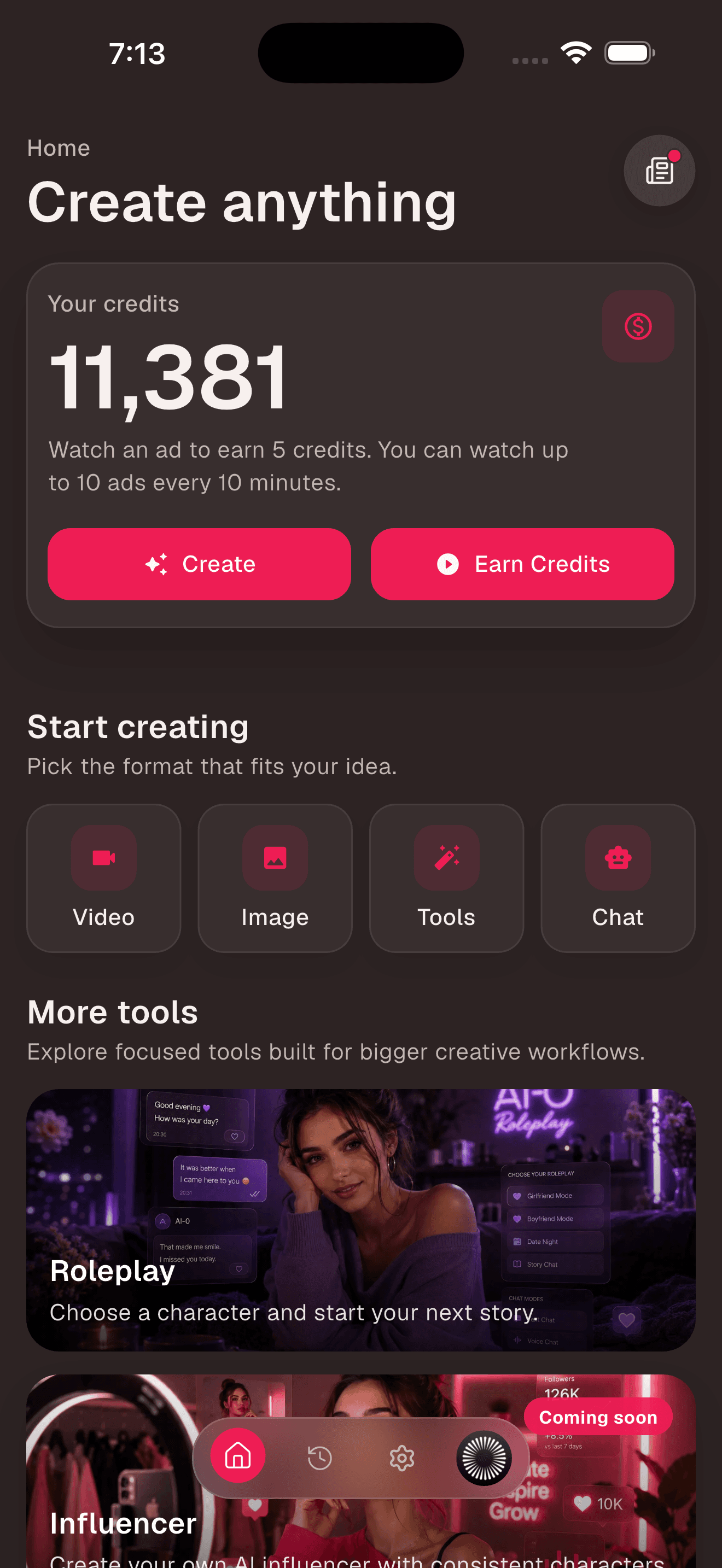
AI-0's free route is a loop rather than a starter sample. When an ad reward is available, you can choose to watch it, receive credits, and use those credits on an image or video model. You do not have to enter a card or let a monthly trial roll into a paid plan.
There is still a cost, just not a charge on your bank statement. Ads take time. Video models require different credit amounts. Generation can queue, and a reward depends on ad availability in your region. Anyone promising unlimited instant AI video for free is skipping over the computing bill somewhere.
How to generate a video without a subscription in AI-0
- Download AI-0 from the App Store and Google Play.
- Open the app, complete sign-in, and check the credit balance on Home.
- Tap Earn Credits if you need more, then choose an available ad reward.
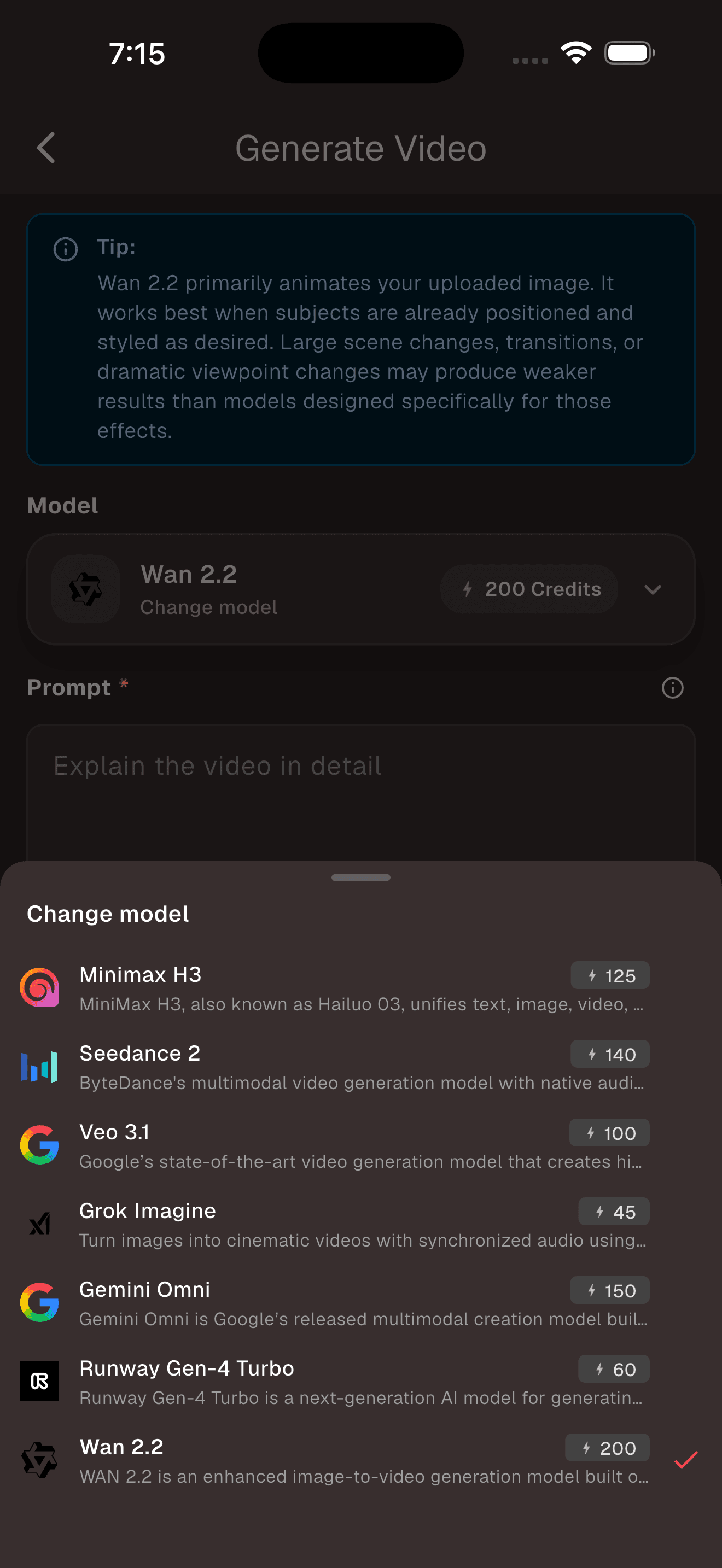
- Tap Video and open the model picker.
- Compare the supported inputs and credit cost shown for each current model.
- Add a prompt and, for image-to-video, upload a clean source image.
- Choose the available duration, check the Generate button's cost, and submit.
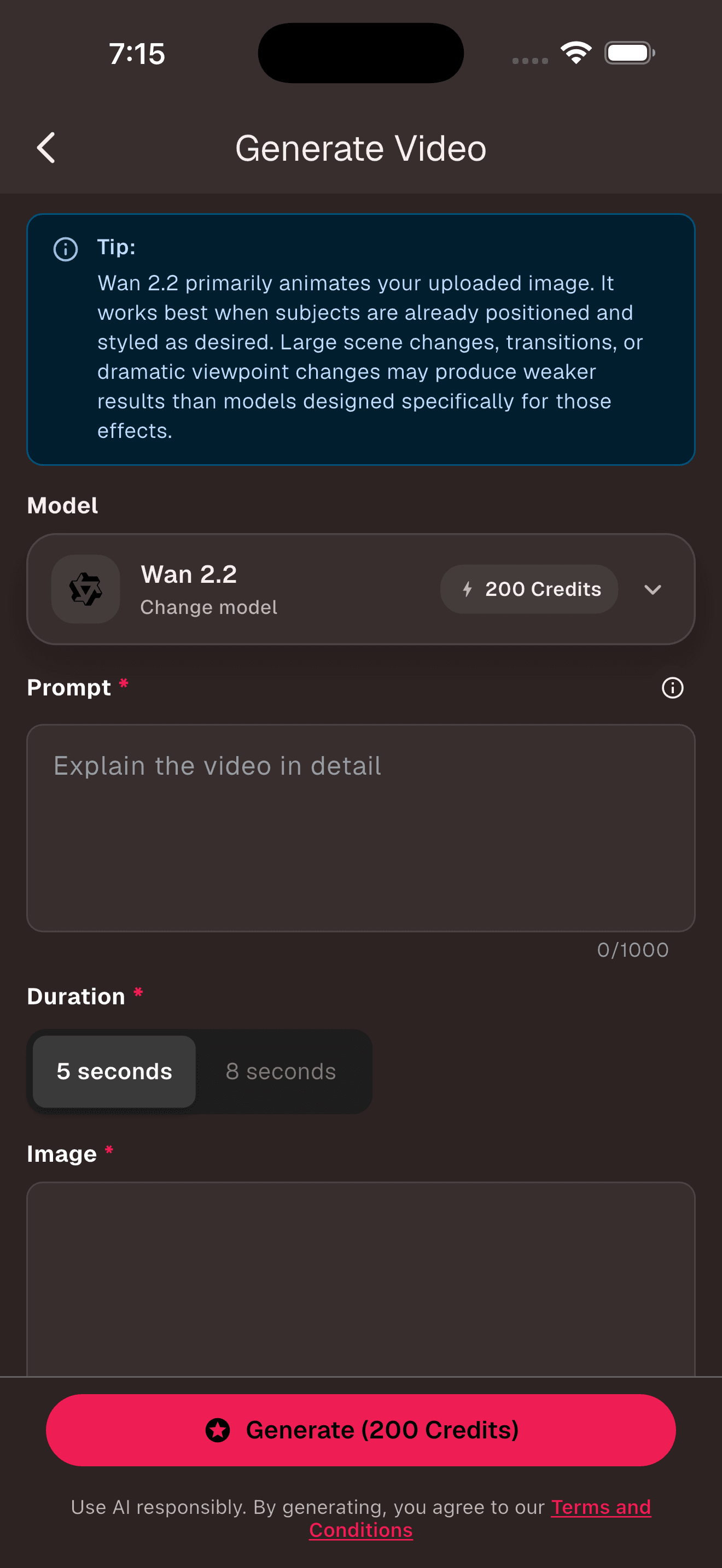
Start with one short shot. A five-second clip of a product rotating is much easier to judge than a miniature film with three locations. If you already have the composition, try image-to-video. If the whole scene exists only in your head, use text-to-video. Our free image-to-video walkthrough goes deeper on motion prompts.
Adobe Firefly: a small recurring allowance
Adobe says the Firefly app includes a limited number of free daily generations for Generate Image, Generate Video, and Generate Sound Effects. When the free credits run out, Firefly shows a subscription paywall on the generation screen. Its mobile app runs on iOS and Android, and projects can sync with the web app.
The daily refresh is more useful than a one-time demo if your experiments are small. The limit is still deliberately small, and Adobe does not promise that every model or setting costs the same. Read the current details on the official Firefly mobile app page.
Canva: generate a clip and finish the post in one place
Canva's advantage is everything around the generated clip: timeline editing, templates, captions, music, and social sizes. Magic Media makes four-second silent video clips, while Canva AI's separate video tool can make longer clips with sound. Canva's help center is explicit that these are different tools.
Canva Free has a shared monthly AI allowance. Its pricing page currently estimates up to 200 Standard AI uses or up to 20 Premium AI uses, depending on which tools you use. A premium video generation can consume more of that shared allowance than a basic task, so “20 free videos” would be the wrong conclusion. Check Canva's plan comparison and Magic Media guide for the current split.
Leonardo.Ai: daily tokens with model-by-model costs
Leonardo.Ai gives Free users 150 tokens every 24 hours. The allowance does not stack if you skip a day. Image and video models each have their own costs, and references, settings, or resolution can change the total. Leonardo shows the amount on the action button before generation.
This can work well for patient experimentation: use today's tokens, return after the reset, and continue. It is less comfortable when a deadline demands several video revisions in one sitting. Leonardo documents both the daily amount and the varying costs in its official token FAQ.
Runway: useful test credits, not an ongoing free plan
Runway's Free plan includes 125 credits once. They do not expire, which is handy if you want to save them for a serious test, but they do not refresh after use. The current Free plan supports a limited, changing set of generation tools. Runway also places a watermark on videos made under that plan and does not sell extra credits to Free users.
In other words, Runway belongs in this article because you can try video generation without subscribing. It does not belong in a list of indefinitely free generators. The official Free plan page confirms the one-time deposit, selected tools, and watermark.
Ad-supported credits versus subscriptions
There is no universally better payment model. Ad-supported credits fit occasional use because you pay with attention only when you want to create. A subscription buys a larger predictable allowance and usually removes some friction. A recurring free quota sits between them: no charge, but you may need to stop when the day or month runs out.
| Access model | Makes sense when | Gets frustrating when |
|---|---|---|
| Optional ads | You create occasionally and want to avoid a bill | You need a large batch on a deadline |
| Daily or monthly free quota | You can spread experiments across several days | One failed attempt consumes a large part of the allowance |
| One-time trial credits | You are evaluating quality before choosing a tool | You expect an ongoing free workflow |
| Subscription | Generation is part of regular paid work | Your usage changes sharply from month to month |
How to make a small free allowance last
- Plan the shot in one sentence before opening a generator.
- Use image-to-video when you need a particular subject or composition to remain recognizable.
- Begin with the shortest duration that proves the motion works.
- Do not spend video credits fixing a crop you could correct in an image editor.
- Keep generated text out of the frame and add titles later in a normal video editor.
- Record the model, prompt, source image, and settings when a result works.
Failed clips are part of the process, but random retries are expensive. Change one thing at a time. If a face drifts, reduce the movement. If the camera invents too much scenery, use a gentler move. If the composition is wrong before anything moves, repair the source image first.
Frequently asked questions
Can I create AI videos without paying for a monthly plan?
Yes. AI-0 lets users earn generation credits through optional ads, while Adobe Firefly, Canva, and Leonardo.Ai provide limited free allowances. Runway offers one non-renewing free credit deposit. Every option limits models, credits, exports, or availability in some way.
Which AI video generator has no required subscription?
AI-0 does not require a monthly subscription to keep earning credits when optional ad rewards are available. Other platforms have free tiers, but their allowances may reset daily or monthly, stop after a trial deposit, or lead to a paywall after the free credits are spent.
Is a no-subscription AI video generator unlimited?
No. Video generation uses substantial computing resources. No-subscription access still comes with credit costs, rate limits, queues, ads, model restrictions, watermarks, or finite trial credits.
Does Runway give free video credits every month?
No. Runway documents its Free plan as a one-time allocation of 125 credits. The credits do not expire, but they do not renew after you spend them, and Free-plan videos carry a watermark.
Can I use free AI video generators for client work?
Check the current license, privacy setting, watermark, and commercial-use terms for the exact tool and model before delivering client work. Free access does not automatically include private generations or unrestricted commercial exports.
Choose the refill model before the demo reel
Use AI-0 if the main goal is to keep generating occasionally without opening another subscription. Use Canva when you also need to assemble the final post. Firefly makes sense for an Adobe workflow, Leonardo.Ai rewards patience with a daily reset, and Runway is best treated as a finite test.
Try one short clip before moving any real project. The question is not whether a tool can produce a beautiful sample. Most of them can. The useful question is how many attempts your workflow needs, and what happens when the free balance reaches zero.
Create on your phone with AI-0
Watch a short ad when you need credits, choose an image or video model, and create without a monthly subscription.
 Download on the App Store
 Get it on Google Play